
Azure Change Analysis

By Majid Maskati
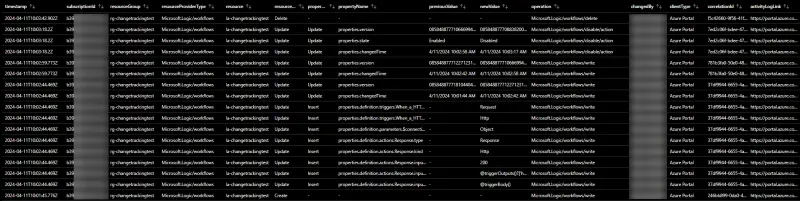
Using Azure Change Analysis to track infrastructure changes.
Azure Change Analysis enhances the visibility of changes made to Azure resources. It does this by tracking these changes at the subscription level and recording them in the Azure Resource Graph's resourceschanges table.
As of March 2024, change tracking now also includes detailed information about the principal that initiated the change, the client type (e.g. Azure Portal, Azure CLI, ARM template), and the operation which resulted in the change (e.g. Microsoft.Web/sites/write). This enhancement means you no longer need to consult Azure activity logs separately to understand who initiated a change and what action they performed. Everything is conveniently available within the Change Analysis.
The structure of the resourceschanges table can make it challenging to clearly view resource and property changes at a glance. However, you can overcome this with some Kusto magic. Below, I've provided an Azure Resource Graph query that simplifies these details into a more digestible table format, including all pertinent change details.
resourceChangeTypeindicates whether this is a create, update or delete of the resource- For resource updates
propertyChangeTypeindicates whether this is an insert, update or removal of the resource property - The
propertyNameas well as itspreviousValueandnewValue changedByis the name or object id of the principal that initiated the changeoperationis the Azure ARM operation which resulted in the changecorrelationIdcan be used to lookup related changes and events from the Azure activity logactivityLogLinkis link to the Azure Portal activity log prefiltered to the change event correlationId and timestamp
resourcechanges
| extend timestamp = todatetime(properties.changeAttributes.timestamp)
| extend changedBy = tostring(properties.changeAttributes.changedBy)
| extend clientType = tostring(properties.changeAttributes.clientType)
| extend operation = tostring(properties.changeAttributes.operation)
| extend correlationId = tostring(properties.changeAttributes.correlationId)
| extend resourceChangeType = tostring(properties.changeType)
| extend targetResourceId = properties.targetResourceId
| parse targetResourceId with '/subscriptions/' subscriptionId '/resourceGroups/' resourceGroup '/providers/' resourceProvider '/' resourceType '/' resource
| extend resourceProviderType = strcat(resourceProvider, '/', resourceType)
| extend activityLogQuery = strcat('{"query":{"subscriptions":["', subscriptionId, '"],"searchString":"', correlationId, '","timeSpan":"3","startTime":"', replace(' ', 'T', format_datetime(timestamp - 3h, 'yyyy-MM-dd HH:mm:ss.fff')), 'Z","endTime":"', replace(' ', 'T', format_datetime(timestamp + 3h, 'yyyy-MM-dd HH:mm:ss.fff')), 'Z"}}')
| extend activityLogLink = iff(correlationId=='00000000-0000-0000-0000-000000000000', '-', strcat('https://portal.azure.com/#view/Microsoft_Azure_ActivityLog/ActivityLogBlade/queryInputs~/', url_encode_component(activityLogQuery)))
| extend changes = iff(array_length(bag_keys(properties.changes))==0, dynamic({'-':dynamic({'propertyChangeType':'-'})}), properties.changes)
| mv-expand propertyName = bag_keys(changes) to typeof(string)
| extend propertyChangeType = tostring(changes[propertyName].propertyChangeType)
| extend previousValue = coalesce(changes[propertyName].previousValue, '-')
| extend newValue = coalesce(changes[propertyName].newValue, '-')
| sort by timestamp, subscriptionId, resourceGroup, resourceProviderType, resource, resourceChangeType, propertyChangeType, propertyName
| project timestamp, subscriptionId, resourceGroup, resourceProviderType, resource, resourceChangeType, propertyChangeType, propertyName, previousValue, newValue, operation, changedBy, clientType, correlationId, activityLogLink
Related insights

Custom Metrics with Application Insights
How to leverage custom metrics in Application Insights for better observability.


Bicep Local Extensions
Exploring the new local extensions feature in Azure Bicep for infrastructure as code.


Copy Key Vault Secrets
A practical approach to copying secrets between Azure Key Vaults.